contact us

Use the form on the right to contact us.

You can edit the text in this area, and change where the contact form on the right submits to, by entering edit mode using the modes on the bottom right.​

Castle Point Court
Glen Allen, VA 23060

8045025506

Garth Callaghan

Napkin Notes Dad

Author

Speaker

Awesome

gande.jpg

Blog

The Napkin Notes Blog

By the Numbers - Kidney Cancer & Garth

WGarth Callaghan

Directly from the American Cancer Society Website:

Although many kidney cancers are found fairly early, while they are still confined to the kidney, others are found at a more advanced stage. There are a few reasons for this:

  • These cancers can sometimes become quite large without causing any pain or other problems.
  • Because the kidneys are deep inside the body, small kidney tumors cannot be seen or felt during a physical exam.
  • There are no recommended screening tests for kidney cancer in people who are not at increased risk.

Let's narrow this down:

  • About 1.6 million new cancer cases were detected in the USA in 2011.
  • About 60,920 new cases of kidney cancer (37,120 in men and 23,800 in women) will occur.
  • About 13,120 people (8,270 men and 4,850 women) will die from this disease.
  • The average age of people when they are diagnosed is 64.
  • Kidney cancer is very uncommon in people younger than age 45, and it most often occurs in people 55 and older.
  • I am 42!
  • Kidney cancer is among the 10 most common cancers in both men (#6) and women (#8).
  • My tumor was 13cm at it's largest point.  That's over 5 inches! 
  • My cancer was removed in December 2011. 
  • The average growth rate for kidney cancer is less than 1cm per year. 
  • Do the math!
  • Kidney Cancer Risk Factors CLICK HERE

How in the heck did this happen to me??

Five Great Gifts for Geeks and Gadget-Lovers

WGarth Callaghan

If you've been out in public, on the internet, or had any contact with the outside world lately, you might have noticed that it's finally the holiday season again! A time for joy, a time for family, and a time for being stumped when it comes to choosing gifts for everyone. I might not be able to tell you which toy will be causing riots at Toys-R-Us this year or which model Lexus to stick a giant red bow on, but I feel confident that I can give you a few tips about electronics and accessories to buy for the gadget-lovers in your life, ranging from the pricey to the rather inexpensive. Take a look and see if anything seems right for your friends or family.


1) iPad 2, iPhone 4S, iPod Touch:
These are the obvious gifts that nearly everyone would be happy to unwrap this winter. Tablets are getting more and more popular, and the iPad 2 is no exception. The iPhone 4S, apart from some battery-life concerns is faster and has several new features like Siri, the voice activated assistant, that previous versions of the iPhone did not have. The iPod Touch is a great way to play music on the go, but it also comes with a camera, can access WiFi, and has many of the same functions as its big brother, the iPhone. All of these devices can access the robust iTunes store to download millions of songs, movies, and apps.

There are two things to consider before buying one of these Apple products: they are quite pricey (they're probably not be gifts that you can afford give to your entire extended family) and new versions might be on the horizon as early as spring. Nothing has been confirmed yet, but rumors of the iPhone 5 and iPad 3 have been around for the last few months. If it's important to whoever is receiving the gift to stay up to date with their technology then you might want to hold off for a few months.

2) Kindle Fire:
Amazon's Kindle Fire is going to do well this holiday season. While the Kindle originally was only an eReader device, it has now branched out into the tablet world. The Kindle Fire might be the biggest threat to the iPad this year, and the $200 price tag makes it even more appealing. It comes with the same abilities as most other tablets on the market, such as a web browser and the ability to play movies, music, games, and books, all found on Amazon's extensive store. It doesn't have quite the same power as the iPad or the trademark user experience that Apple has developed, but for its price it's an excellent alternative for someone who doesn't necessarily care about the more technical details of other Android or iOS devices.

3) Touch screen Gloves:
As the weather is starting to get cold, you may have noticed that your touch screen devices are not working while you are wearing gloves. Rather than making your hands suffer the cold while you make that text, companies are now making gloves that allow you to use your device without removing your gloves. After a little searching online I have found that there are two main kinds of these gloves: some that have detachable fingers and some that are made of a special material that allows your fingertips to remain conductive inside your gloves. These Agloves seem like they would make a good stocking stuffer for the textoholic in your family!

4) Headphones:
I see so many people walking around with the white headphones that came with their iPods and I remember the time when I used to be one of them. I thought those headphones were fine -- they sounded ok and they fit alright. It wasn't until they fell apart and I was forced to buy a new pair that I realized my mistake. Since then I have had two pairs of Sennheiser earbuds that are more comfortable and sound significantly better, and I will never turn back. If you have a music-lover in your life who is still using the free headphones that came with their phone or mp3 player, you owe it to them to get them new headphones. Like I said, I am very pleased with my Sennheiser earbuds and have heard great things about their traditional headphones, too. I see a lot of college students with Beats by Dr. Dre headphones, which seem to be a little over-priced but popular. A quick search on Amazon could tell you which others are highly-rated if you want more options.


5) Xbox Kinect: After the Nintendo Wii popularized the use of motion in video games, Microsoft responded with the Kinect. By using a camera that is set up near your TV, the games are able to take your movement as the input, causing you to actually get off the couch and move around (a scary prospect for some). A few years ago, the technology inside the Kinect would have cost thousands of dollars (really) but now it goes for as little as $100. Programmers are even using the Kinect for many other interesting purposes, so it's not too farfetched to say that you might even use it outside of gaming before too long. For casual and hardcore gamers alike, the Kinect is a must have for anyone with an Xbox 360.


There are plenty of great electronics on the market these days -- I didn't even mention other tablets like the Samsung Galaxy Tab or other Android phones. Am I missing anything else important, or have you come up with a great gift that you would like to share? Leave us a comment and tell us about it!

Prayer Shawl

WGarth Callaghan

I received a gift of a Prayer Shawl today.  I was moved to tears.  It's warm.  It was knitted with prayers for my good health. 

It's a nice brown with three green stripes.  It fits this sick Irishman well. 

Five Tips for the Holiday Season

WGarth Callaghan

It's December now, which means it's officially THAT time of year. Time to deck your halls, put up the menorah, or whatever else it is that you might do for the holidays. Every family has a tradition that goes back for years -- maybe even for generations. This doesn't mean that we can't add a few technological tweaks to save time and money and bring the family together, though! Here I give you five ideas to make the month just a little bit merrier.


1) Amazon's Holiday Flurry Deals: Starting this past weekend and running through Saturday, Amazon will have big sales on particular categories each day. It seems that some deals will last until Christmas, but this week will have more specific sales, like 60% off thousands of DVDs and Blu-rays on Wednesday and a $100 Amazon Gift Card with the purchase of certain smart phones on Friday.


For more information about what exactly is on sale, check Amazon every day this week!

2) Kayak.com: Finding an affordable flight online can be quite stressful, especially during a time when lots of others are also flying. There are dozens of websites that claim to get you the cheapest flights, but which one is really the best? With Kayak, it doesn't matter. Kayak compares all of the popular sites to book flights (Orbitz, Priceline, Hotwire, etc.) as well as the airlines themselves so that you can get the best deal without looking at ten different sites. When I travel, Kayak is my go-to site for flights, hotels, and whatever else I might need.

3) Skype: If it isn't possible to get everyone together for the holidays, it's not the end of the world. Now that Skype has become so popular, it's incredibly easy to have a face to face conversation with people on the other side of the world. I realize that Skype isn't exactly a secret (especially to people who are reading a tech blog), but the point of bringing it up in this list is to remind people to set up their parents, grandparents, aunts, uncles, and whoever else doesn't have it yet. I recently had the opportunity to watch a focus group with older adults (all over the age of 65) talking about technology and the web, and all six participants had used and LOVED Skype. Simple things like eating Sunday breakfast with Grandma over Skype can really mean the world to them. When you can, try to set up your whole family to be able to video chat online!

4) Sale Aggregators: There are quite a few sites out there that give you information about sales from multiple stores, but there are two that stand out to me. Both of these sites are active year-round, but they really come in handy during the holidays.

SaleLocator is both a website and an iPhone/Android app that uses your zip code to look for deals closest to you. If you plan on leaving the house to do your holiday shopping, just search for the item you plan on buying and it will tell you if there are any deals in stores nearby, saving you from driving all over town or checking the website of every store in town that might sell that TV. It also helps you compare prices if you find an item in a store but want to check to make sure the WalMart down the street doesn't have a better deal. I find that this works really well in some areas but not so well in others, so check to see if people are reporting sales in your part of town.

If you like to do your shopping from the comfort of your computer chair, don't buy anything without checking RetailMeNot first. This site has coupon codes for thousands of websites, often providing deals like free shipping or a percentage off of an entire purchase. Just use the codes they provide at checkout on whatever site you're using and enjoy the savings!

5) NORAD Santa: The North American Aerospace Defense Command likes to have fun during the Christmas season by using high-tech means to track Santa's progress with Google Earth and video updates about his progress. Before Christmas, though, there's a countdown until Santa's flight and plenty of games for kids. Maybe this isn't the most useful tip on the list, but what's wrong with a little fun for the holidays?


There's still a few weeks left until the holiday season is in full swing, which is more than enough time to get your planning and shopping done before the last minute. If you are one to put things off until the last minute, I hope these tips can at least save you a bit of time, money, and stress. Anybody else have websites or apps that they like to use during this time of year? Leave us a comment!

My First Shirt!

WGarth Callaghan

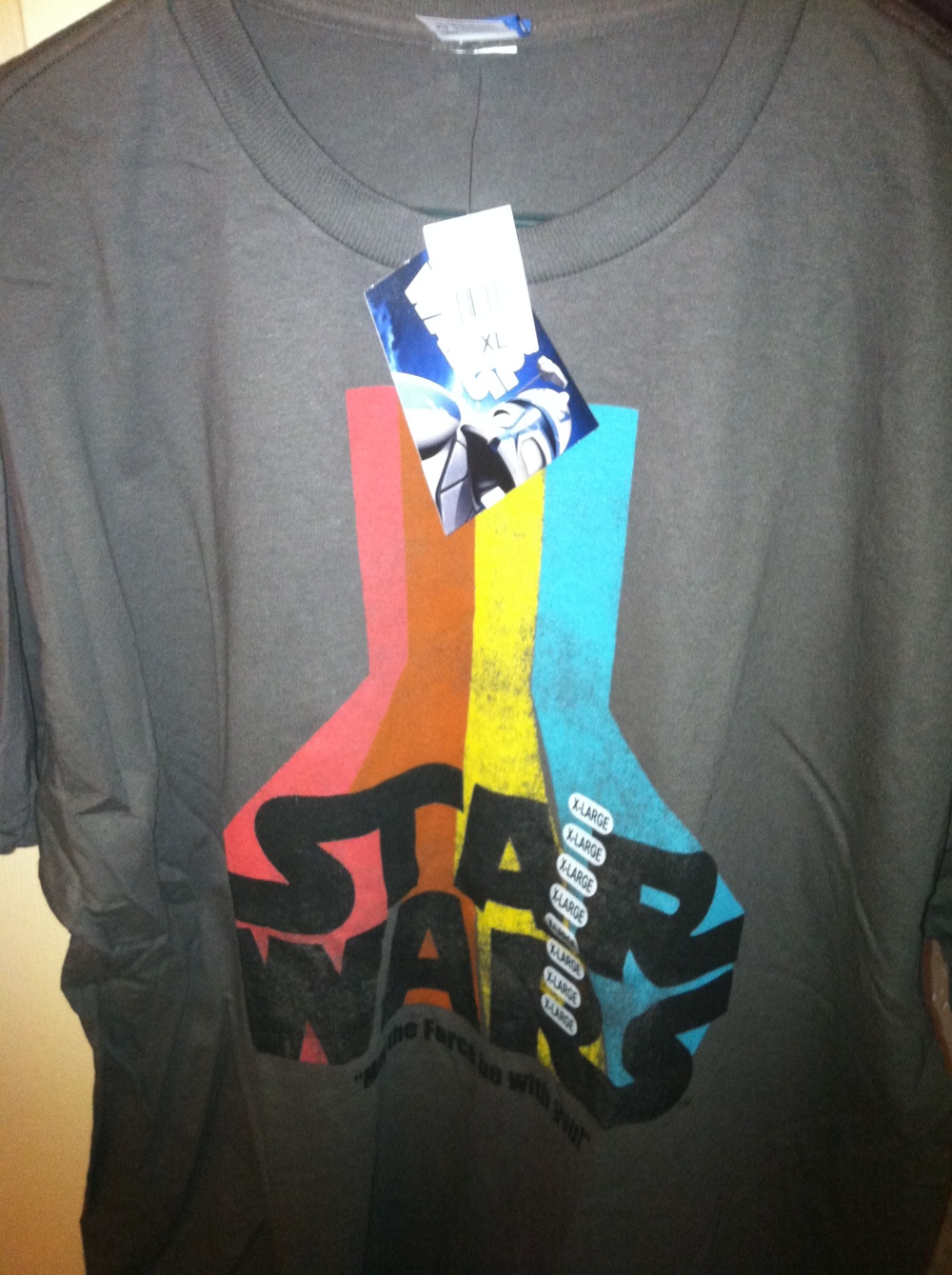
I received my first Star Wars shirt in the mail today!!

It's a classic design.  There was no return address, but I suspect I know the donor and I am deeply touched. 

I love you and thanks for your support!

Why are people donating Star Wars Shirts to me? CLICK HERE


Five Things to Look for When Buying a New Laptop

WGarth Callaghan

Black Friday is right around the corner and many people will be searching for the best deals on phones, Blu-Ray players, and TVs. Stores and websites around the country will be having great deals on computers, too, but how do you know if that computer is right for you? Typically you're presented with a list of specs with little to no explanation as to what they mean. Here I'll talk about five of the most important properties to look out for when buying a new laptop.


(Note: This all refers to PCs, not Macs, as there are likely to be many more deals on PCs this week.)


1) CPU: The Central Processing Unit (often just called "the processor") is basically the brain of your computer. It's what's making it run and what's carrying out the millions of complicated instructions and calculations so that you can check your Facebook or open a new Word document. There are all kinds of CPUs on the market today, but the basic rule of thumb right now is to stick with the Intel Core i series. In this series you have three options: i3, i5, and i7. i3 processors are the cheapest, and are great for casual users who surf the web, check email, and make Word documents. i5 is a step up, with boosted speed for running photo or video editing software or other programs that might be more demanding. i7 is the fastest of the bunch, and is great for running games, heavy video editing, and 3D rendering. This is the most advanced option, and if you don't know whether or not you need it, you probably don't. I would recommend the i3 for most users as it is by no means slow and is typically the cheapest option. However, if you see a good deal on an i5 (or even i7), it won't hurt to have that extra speed if you think you might need it someday. Just keep in mind that you won't see a difference in checking emails or opening Microsoft Word with a faster processor -- it really only makes a difference in more advanced programs.

2) RAM: Random Access Memory (usually referred to as just "memory") is the temporary storage used by your computer when it is powered on. Your operating system and applications will store data in memory that it might need to retrieve again soon. As you might imagine, the more memory you have, the more your computer can handle at one time. When doing your shopping you might see computers that range from 2GB - 8GB of RAM. I would recommend at least 4GB for the casual users who mainly just surf the web or create documents -- anything less will limit the capabilities of your machine and is becoming obsolete. Again, you can go with more than 4GB if you plan on gaming or using more intensive software, but you won't see a difference in speed for your basic tasks.

3) Hard Drive:
This one is a bit more basic: the more space your hard drive has, the more data you can store on it. For users who don't store much on their computers besides documents, a 320GB hard drive is more than enough. For people with a lot of photos, music, games, or large programs, you might be more interested in a 500GB or 750GB hard drive. Don't forget: you can always get an external hard drive to store files on if you want to leave space on your computer.

4) Operating system: As I said before, if you are reading this I assume you are interested in buying a PC. There are still a few PCs that come with Windows XP installed, and I would highly recommend you avoid them. XP was great, but it's now over ten years old, and is not even supported by Microsoft anymore. As for Vista, well...we don't talk about that anymore. Now you should be shopping for a computer with Windows 7. There are two versions of Windows 7: 32 bit and 64 bit. A 32 bit operating system is ok for basic use, but it can only utilize up to 4GB of RAM and might not support more advanced software. I would recommend looking for a computer with a 64 bit OS because it will run faster and is less likely to become obsolete in the near future. The only downside with a 64 bit OS is that it could have trouble running old programs and hardware, but this is becoming less of an issue as new software and hardware has come out to support newer systems.

5) Screen size:
When it comes to the size of your display, bigger isn't necessarily better. The common sizes for regular laptops (not including netbooks) is between 13.3-17.3 inches diagonally. 13.3-15.6" is good for most users and is still very portable. 17.3" displays are very nice if your laptop is likely to live at your desk, but if you plan on carrying it around very often it is pretty bulky and heavy. Again, think about how you plan on using your laptop: if you are carrying it back and forth to the office you might want a smaller one. If you plan on watching lots of movies and playing games, a larger screen might be better.


Of course there are other issues to consider when buying a new computer. You might want a laptop with increased battery life if you plan on being on-the-go for most of the day, or you might want a higher-end graphics card (although this is mainly for gaming, and isn't very important for most users). Some computers even come equipped with a Blu-Ray player now. In the end, it all depends on how you plan on using your laptop. It won't hurt to have a top-of-the-line computer if you aren't planning on doing anything too advanced, but why pay all that extra money? Hopefully after reading these five points the computer-buying process is a little less mysterious and you'll be able to buy a new laptop with confidence this Black Friday. Good luck, and happy (bargain) hunting!

Five Internet Services for Music Lovers

WGarth Callaghan

The internet has done some incredible things for the music industry (and also some not so incredible things). Music has never been as accessible as it is now, giving music lovers easy access to their old favorites and to new artists they might never have heard of. In this blog I wanted to highlight five websites and services that are changing the way that people listen to and discover music.


1) Pandora: This website has been around for years, providing personalized radio stations designed to only play the music that you want to listen to now. For those who haven't used it, the idea is that you go onto Pandora and enter an artist, track, or genre that you are in the mood to listen to, and it will play similar songs. For example, if you enter "The Beatles," Pandora will play tracks by The Beatles, their solo projects, The Rolling Stones, The Beach Boys, and other similar artists. There are occasional ads, but it's a small price to pay for a free service that streams endless music without repeating. You can also pay a small subscription fee if you want to get rid of the ads and have a little more control. Pandora is great if you work on a computer all day and are allowed to listen to music.

2) Spotify: Spotify is another free (ad supported) music streaming service, but rather than playing random music based on your initial input, you can choose the songs or albums that you want to listen to, much like you would in iTunes or other music players. All that you need to do is to head over to spotify.com, register a free account (or a paid one if you want the perks, like no ads), download and install the Spotify player, and start listening. Music is acquired by Spofity through deals with record companies, so you can support the musicians by listening to their albums (although you can surely give them more support by actually buying their albums and seeing them live). There is a surprisingly huge library to choose from including new releases by chart-topping artists as well as more obscure musicians. I find that it's a great way to "try before you buy." Rather than wasting money on an album you might not even like, you can give it a listen or two to make your decision, saving you money and hard drive space.

3) Last.fm: This website is probably a little less well-known than the previous two, but is a great resource for music-lovers who like to keep track of what they're listening to. By signing up for a free account and installing a small piece of software, Last.fm tracks every song you listen to in your music player of choice (including Spotify!) on your computer, building a profile so that you can see your compatibility with other users and find out about similar artists who you might not know. Sometimes I like to look at my stats or the stats of my friends to see who we have been listening to the most in the last week/month/year. It also tells you if an artist you might be interested is playing near you, saving you from having to look up tour dates or hear about it by chance. Last.fm provides a very similar service to Pandora, letting you make radio stations for artists or genres that you are interested in, or even recommended music that you have not listened to. This is definitely a really fun service if you are interested in exploring new musical worlds.

4) Discogs: WARNING: serious music nerds only. Discogs is a site where people can create an account and keep track of their entire music collection, down to which format you own it in or which pressing of vinyl it is. Those who are less obsessive can use it as a resource to learn about every release an artist has ever been a part of, even if it was a production credit or backing vocals on a deep-cut from some obscure album. I like to use Discogs to see if I am missing anything by my favorite artists, or to learn about some details that most other websites don't typically care about. Again, this site isn't for everyone, but it might be interesting to check out if you are really passionate about certain artists or albums.

5) Cloud Services: The traditional methods of obtaining music (going to a store, purchasing a physical artifact, and listening to it) is certainly becoming less popular in favor of buying digital music to store on a hard drive, but even that "new" way of listening to music is being threatened. There are quite a few new services emerging that will store your music "in the cloud," meaning that your music will be stored online so that you can access it anywhere you have an internet connection. The benefit of this is that you can free up space on your devices and that you don't have to have your computer with you to be able to play your music. Amazon has been offering its Cloud Player service for accessing your music and data on your computer or Andriod device. Google has a Music Beta service which is currently invite only that supports computers and Android devices as well. Apple also has its iCloud service for iOS devices and PCs, as well as iTunes Match (scroll to the bottom of this link for more info), which should be released very soon. All of these services have different price rates and some slightly different features, so if this is something you are interested in I highly recommend you do more investigating into which would be right for you.


Needless to say, this is an exciting time to be a music fan. As the internet has in some cases hurt the music industry because of piracy, it has also given new artists ways to get their music out there to the public who probably never would have heard of them otherwise. With the five websites and services that I have highlighted above, you will be able to listen to your favorite music almost anywhere you want and discover new sounds that you might not have heard from the radio or by shuffling your iTunes library.